
Active File Cleaner
Glorich LimitedTools
3.251.00 Reviews
- Version
- 4.0
- Installs
- 100.00K
- Age Rating
- Everyone
Screenshots
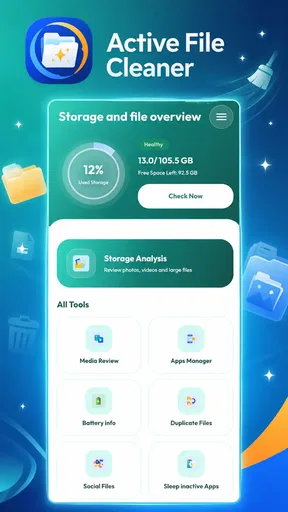
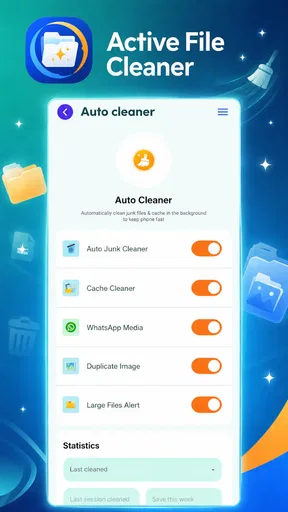
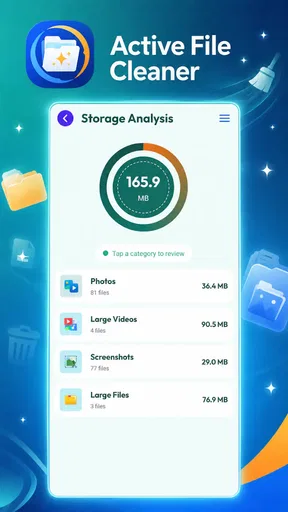
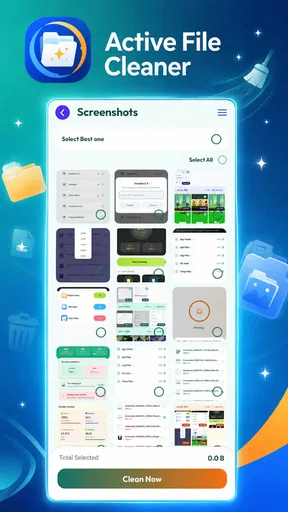
Our Review of Active File Cleaner
 Analysis by Appyee
When a phone starts warning me about storage, I usually want a simple answer: what can I remove safely, and what should stay? Active File Cleaner is built for that practical moment. It is a free tools app from Glorich Limited, aimed at people who want a more direct way to review unwanted files rather than manually opening folder after folder.
My overall impression is that its value depends less on dramatic promises and more on how much control you want during cleanup. It can be appealing if your main goal is to inspect clutter and make a few deliberate decisions. It is less convincing for someone who expects a fully automatic maintenance service that quietly handles everything in the background.
How I Would Decide Whether to Use It
The first question is not simply whether a cleaner app is useful. It is whether you need a separate tool at all. Android already offers built-in storage controls, and many file managers can help locate large or duplicated items. Those options have the advantage of being familiar and closely tied to the operating system. A dedicated cleaner becomes more interesting when you want cleanup to feel like a focused task instead of a setting buried inside the phone.
In my experience, the most important decision criterion is confidence. A cleanup tool should help me understand what I am about to remove, not pressure me into tapping a large button without context. I would use Active File Cleaner when I had a specific storage problem, such as a crowded downloads folder, old media, or files left behind after moving content elsewhere. I would not treat it as a substitute for a backup routine.
The app is listed for Everyone and works with devices running Android 8.0 or later. That makes it relevant to a broad range of Android phones, including older hardware that may not support newer utilities. Compatibility alone does not guarantee a smooth experience on every device, but the minimum operating-system requirement is reasonably approachable for a storage tool.
Its current version is 4.0, so I would still take a moment to look over each cleanup result before confirming anything. Version labels can indicate active development, but they do not remove the need for careful file management. The safest habit is to identify the file category first, preview or inspect the items where possible, and only then delete material I know I no longer need.
What a sensible cleanup session looks like
I would begin with a narrow goal instead of asking the app to solve every storage issue at once. For example, if my phone is full after a weekend trip, I would focus on downloaded videos, duplicate-looking photos, and temporary files created by apps I no longer use. A narrow pass makes mistakes less likely and lets me see whether the app is actually saving useful space.
There is also a useful distinction between “old” and “unwanted.” An old tax document may be more important than a recently downloaded image. Likewise, a large video may be worth keeping while dozens of small files are irrelevant. I would use any sorting or grouping the app presents as a way to investigate, not as permission to delete everything in a suggested category.
One practical workflow is to clean before a backup rather than after one. I can remove obvious clutter, check that important photos and documents remain, and then back up the smaller, more organized collection. Another is to clean before installing a large game or recording a long video. In both cases, the app is most useful as a decision aid, not as a magic source of extra capacity.
Where it feels most useful
The strongest case for this app is the person who wants a dedicated cleanup screen and does not enjoy navigating Android’s file structure. A focused tool can reduce the mental work involved in remembering where downloads, shared files, and forgotten media tend to accumulate. That matters on phones used for messaging, work documents, screenshots, and offline entertainment all at once.
I can also see it helping less technical family members who understand “free up space” more easily than a series of storage menus. I would still guide them through the first session, especially if their phone contains irreplaceable pictures or work files. Once they understand what the categories mean, a repeat cleanup can become less intimidating.
Another non-obvious use is preparing a phone for handoff. Before giving an older device to a family member, I could use a cleaner as one part of a broader process: move personal files, review downloads, remove forgotten media, and then perform the proper account and reset steps separately. A file cleaner should not be confused with a privacy wipe, but it can make the review stage more manageable.
Where the app has an advantage over ordinary file browsing
Manual browsing gives me maximum visibility, but it also demands patience. I have to remember which folders matter, recognize unfamiliar names, and compare files myself. A purpose-built cleaner can make the first pass more approachable by bringing likely clutter into one workflow. For someone who repeatedly postpones cleanup because the file manager feels tedious, that convenience may be the main benefit.
The app’s free price also lowers the barrier to testing it. I can try it without planning a subscription or treating the first session as a financial commitment. That does not make every result automatically worthwhile, but it makes the decision easier: if the review process saves time and feels understandable, it has earned a place in my toolkit; if it does not, I can return to the system’s own storage controls.
Its adoption is already substantial, with over one hundred thousand installs, while the average rating sits at 3.2 from roughly three hundred ratings. I read that combination as a reason to keep expectations measured. It suggests that people are trying the app, but the rating does not support blindly assuming that every device and cleanup style will produce the same experience.
The trade-off between convenience and control
Cleaner apps always involve a trade-off. The more automated the experience becomes, the more important it is to understand how files are selected. The more detailed the review process becomes, the more time I may need to spend. I prefer a middle ground: let the app surface candidates, then let me make the final call.
This is especially important with media folders. Messaging apps can create images, videos, voice recordings, and forwarded documents that look disposable at first glance. A file’s location may tell me how it arrived, but not whether it still matters. I would check names, dates, and context before removing anything from a conversation or shared folder.
I would apply the same caution to downloads. A downloaded file can be an obsolete installer, but it can also be a boarding pass, a contract, or a reference document I still need. The practical tip here is to move important documents into a clearly named folder before running a broad cleanup. That small bit of organization makes later decisions much safer.
When another category of tool may fit better
If I only need to find one unusually large file, Android’s built-in storage view or a standard file manager may be faster. Those options are usually better when I already know what I am looking for and want to avoid installing another utility. Active File Cleaner makes more sense when I want a guided review of several kinds of clutter in one sitting.
If my main concern is duplicate photographs, a gallery application with strong visual comparison may be a better match than a general file-cleaning tool. Visual similarity can be difficult to judge from filenames alone. I would rather compare the pictures side by side than delete based only on a broad duplicate suggestion.
If the problem is app cache or system-managed storage, the phone’s own settings may be the safer first stop. System tools are designed around the device’s storage model and can explain certain categories more clearly. A cleaner app should complement those controls, not replace them when the issue involves operating-system data or an application that is behaving badly.
Privacy-focused users may also prefer manual review. I would be cautious about any utility if I could not easily understand what it wants to remove or if its workflow made me feel rushed. The right tool is the one that gives me enough information to act confidently, even if that means the cleanup takes longer.
A realistic everyday example
Imagine I am preparing for a flight and my phone says storage is nearly full. I have several offline videos, a crowded downloads area, screenshots from old conversations, and photos from previous trips. I would open the cleaner and use it to identify candidates, but I would not run a single indiscriminate deletion pass.
First, I would deal with obvious temporary material and screenshots I recognize. Next, I would inspect downloads individually, moving travel documents into a named folder if I still need them. Then I would review large videos, checking whether they are already backed up before removing them. Finally, I would return to the phone’s storage settings to see whether the result is enough for the flight downloads.
This workflow shows both the app’s usefulness and its limits. It can make the search for clutter more organized, but I still provide the judgment. If I needed a guaranteed amount of free space immediately, I would also consider moving files to a computer or cloud storage rather than relying on deletion alone.
What switching to it really costs
Because the app is free, the main cost is not money. It is attention. I need to learn how its results are grouped, understand which suggestions are safe in my own situation, and build a habit of checking before deleting. For a phone with a simple file structure, that learning curve may not be worthwhile.
There is also the cost of changing habits. If I already use Android’s storage tools every month, adding another cleaner can create two places to perform similar work. That can be useful if the new workflow is clearer, but it can also make me wonder which tool should be trusted. I would avoid running multiple cleaners aggressively on the same device because repeated automated decisions can make it harder to track what has changed.
For a family phone, the switching cost includes teaching the user what not to remove. I would create a short personal rule: documents, photos, recordings, and anything with an unclear name stay until checked. That rule is more valuable than any one-tap cleanup shortcut because it remains useful across different storage tools.
Who should try it and who should skip it
I would recommend giving Active File Cleaner a try if you want a free, dedicated way to review clutter, use an Android phone running 8.0 or newer, and are comfortable making the final deletion decisions yourself. It is particularly suitable for people whose storage problems come from accumulated downloads, screenshots, shared media, and forgotten files rather than from one specific technical fault.
I would skip it if your phone has plenty of free space, your built-in storage manager already feels clear, or you expect a cleaner to identify personal files with perfect accuracy. I would also choose a more specialized solution when the goal is photo deduplication, secure device erasure, or diagnosing a failing storage chip. Those are different jobs and deserve tools designed for them.
My recommendation after weighing the alternatives
My recommendation is cautious but positive. Active File Cleaner is worth testing as a practical cleanup companion, especially because it is free and accessible to a wide range of Android users. I would judge it by the quality of its review workflow, not by how many items it claims to find. The best result is not the biggest deletion; it is a cleaner phone without losing anything important.
Glorich Limited has positioned this as a tools app rather than something I would use for entertainment or daily communication. That focus is appropriate: I would open it when storage has become a problem, complete a careful session, and then close it. It does not need to become a constantly running part of my routine to be useful.
For me, the deciding rule is simple: use the app to find candidates, but keep the final decision in your hands. That approach preserves the convenience of a dedicated cleaner while avoiding the biggest risk of automated file management. If that balance matches the way you handle personal files, this app is a sensible addition. If you want complete control through familiar system menus, the built-in alternative may remain the better choice.
With a free price, an Everyone age rating, and a current version of 4.0, it is easy to experiment without making a major commitment. Just remember that cleanup is only one part of storage management. Back up valuable files, separate important documents from disposable downloads, and treat every deletion suggestion as something to inspect. Used that way, Active File Cleaner can turn an annoying storage warning into a manageable, deliberate task.
Verdict
Strengths of Active File Cleaner
- Quickly identifies large and unnecessary files.
- Simple interface that is easy for beginners to navigate.
- Helps free storage space without complicated setup.
- Useful file categories make cleanup decisions clearer.
- Scans can reveal forgotten downloads and duplicate content.
Limitations of Active File Cleaner
- Some files may require manual review before safe deletion.
- Cleaning results depend on the device’s storage structure.
- Advanced automation options may be limited.
- Ads or upgrade prompts can interrupt the cleanup process.
- Deep scans may take longer on devices with extensive storage.
Similar Picks in This Category
View All
Google LLC4.0

Gboard - the Google Keyboard
Google LLC4.5

Google Play services
Google LLC4.3

Google Play Store
Google LLC4.9

Files by Google
Google LLC4.5

SHAREit: Transfer, Share Files
Smart Media4U Technology Pte.Ltd.4.3
Frequently Asked Questions
What is Active File Cleaner and what does it do?
Active File Cleaner is a utility designed to help identify and remove unnecessary files from a device. It can be useful for finding temporary data, cached items, duplicate content, and other files that may consume storage space. Before deleting anything, review the results carefully, because some files may still be useful to you or required by an installed application.
Is Active File Cleaner safe to use on Android or iOS?
The app can generally be used safely when downloaded from an official app store and granted only the permissions it genuinely needs. However, no cleaning tool should be treated as completely risk-free. I recommend checking each category of detected files before confirming removal, avoiding aggressive one-tap cleaning unless you understand what will be deleted, and keeping a current backup of important photos, documents, and other personal data.
Can Active File Cleaner improve my phone’s performance?
Active File Cleaner may help when your device is running low on storage, particularly by removing large temporary files, obsolete downloads, or duplicate items. The improvement is usually more noticeable in available storage and app stability than in raw processing speed. It cannot repair damaged hardware, solve every battery problem, or make an older phone perform like a new one, so expectations should remain realistic.
Will Active File Cleaner delete my photos, videos, or important documents?
The application should not remove personal files automatically without presenting them for review, but users should still be careful because cleaning suggestions can include files that look unnecessary while having personal value. Check file names, locations, previews, and sizes before deletion. Move anything important to cloud storage or another device first, and be especially cautious with folders used by messaging, camera, or work applications.
Does Active File Cleaner require a subscription or special permissions?
Availability of free tools, premium features, advertisements, and subscription plans can depend on the version and platform. Before starting a trial, read the pricing and renewal information shown in the store listing or inside the app. Also review requested permissions, such as access to files or photos, and deny anything unrelated to cleaning. Removing permissions later may limit certain features but can improve privacy.
